Search Filtering Using the Filter Object
Use the filter object to narrow search results based on indexed document properties such as categories (domains, path segments, document types), custom fields, language, and date. This filtering applies in ready-made views, Search UI Library instances, and via the Search API by including the filter object URL-encoded as the filter parameter.
This guide details the filter object structure, the relevant document properties, and examples that show common filtering scenarios.
Filter Object Overview
The filter object lets you specify conditions on document properties to include or exclude results. You can combine multiple conditions using logical operators and apply range comparisons for numeric or date values.
Supported operators:
- Logical operators:
and: all conditions must matchor: at least one condition must matchnot: negates the condition
- Comparison operators:
gt: greater thanlt: less thangte: greater than or equal tolte: less than or equal to
Example filter object combining operators
Select items from domain www.example.com, in categories products or services, excluding clearance items, made by Apple, priced between 100 and 1000, and excluding PDF or DOCX documents:
{
  "and": [
    { "category": "0xwww.example.com" },
    { "or": [
      { "category": "1xproducts" },
      { "category": "1xservices" }
    ]},
    { "not": { "category": "2xclearance" }},
    { "custom_fields.manufacturer": "apple" },
    { "range": {
      "custom_fields.price": {
        "gte": 100,
        "lte": 1000
      }
    }},
    { "not": {
      "or": [
        { "category": "doctype_pdf" },
        { "category": "doctype_docx" }
      ]
    }}
  ]
}
Category Properties
Categories are indexed properties representing:
- Domains and path segments
- Document types
1. Domains and Path Segments
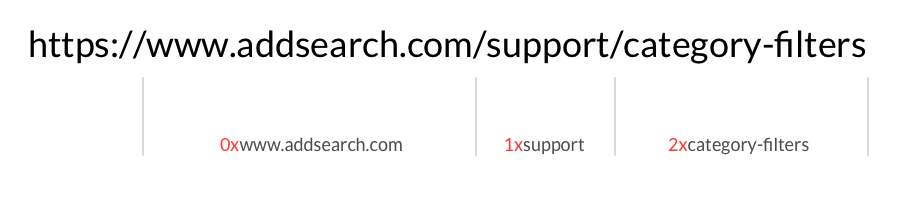
AddSearch indexes domains and path segments with prefixes that indicate the type and depth:
| Prefix | Description |
|---|---|
| 0x | Domain level |
| 1x | First path segment |
| 2x | Second path segment |
| 3x | Third path segment |
For example, the URL www.addsearch.com/documentation/category-filters indexes these segments:
0xwww.addsearch.com1xdocumentation2xcategory-filters
Example filter objects for domains and paths
-
Return results from
www.example.com:{ "category": "0xwww.example.com" } -
Exclude results from
forum.example.com:{ "not": { "category": "0xforum.example.com" } } -
Return results from the
/blog/path segment:{ "category": "1xblog" } -
Return from
www.example.com, excludingforum.example.comand/../past-calendar-events/:{"and": [{ "category": "0xwww.example.com" },{ "not": { "category": "0xforum.example.com" } },{ "not": { "category": "2xpast-calendar-events" } }]} -
Return results from
/products/or/blog/:{"or": [{ "category": "1xproducts" },{ "category": "1xblog" }]} -
Return results from
www.example.com/manufacturers/apple/:{"and": [{ "category": "0xwww.example.com" },{ "category": "1xmanufacturers" },{ "category": "2xapple" }]}Alternatively:
{ "category": "0xwww.example.com/1xmanufacturers/2xapple" }
2. Document Types
Document types are indexed with these category identifiers:
doctype_htmldoctype_pdfdoctype_docdoctype_docxdoctype_pptdoctype_pptxdoctype_xlsdoctype_xlsx
Examples
-
Only PDF documents:
{ "category": "doctype_pdf" } -
All Microsoft Office documents:
{"or": [{ "category": "doctype_doc" },{ "category": "doctype_docx" },{ "category": "doctype_ppt" },{ "category": "doctype_pptx" },{ "category": "doctype_xls" },{ "category": "doctype_xlsx" }]} -
Newer Microsoft Office formats:
{"or": [{ "category": "doctype_docx" },{ "category": "doctype_pptx" },{ "category": "doctype_xlsx" }]} -
Exclude PDFs and HTML:
{"not": {"or": [{ "category": "doctype_pdf" },{ "category": "doctype_html" }]}}
Custom Fields
Custom fields index content added via custom-fields tags or defined through the Custom Fields manager. These fields can include numeric values to filter by range, such as prices or review scores.
Learn more in Using Custom Fields.
Examples
-
Filter by manufacturer (Apple):
{ "custom_fields.manufacturer": "apple" } -
Filter for Apple with specific models and color:
{"and": [{ "custom_fields.manufacturer": "apple" },{"or": [{ "custom_fields.model": "iphone-15" },{ "custom_fields.model": "iphone-15-plus" }]},{ "custom_fields.color": "yellow" }]} -
Products priced between 800 and 1500:
{"range": {"custom_fields.price": { "gt": 800, "lt": 1500 }}} -
Reviews between 3 and 5:
{"range": {"custom_fields.reviews": { "gt": 3, "lt": 5 }}} -
Apple products, excluding yellow, with price or review filtering:
{"and": [{ "custom_fields.manufacturer": "apple" },{ "not": { "custom_fields.color": "yellow" } },{"or": [{"range": {"custom_fields.price": { "gt": 800, "lt": 1500 }}},{"range": {"custom_fields.reviews": { "gt": 3, "lt": 5 }}}]}]}
Language Filtering
Languages are indexed from page metadata. For details, see Language Indexing.
Examples
-
English documents:
{ "language": "en" } -
Exclude English:
{ "not": { "language": "en" } } -
Documents in Swedish or Finnish:
{"or": [{ "language": "se" },{ "language": "fi" }]}
Note: Verify if se is the intended code for Swedish (often sv).
Date Filtering
Document dates come from page tags or default to the first indexed date. See Page Publishing Time for details.
Example
-
Documents dated between January 1 and December 31, 2024:
{"range": {"doc_date": {"gte": "2024-01-01","lte": "2024-12-31"}}}
This guide helps you build precise filters for your AddSearch search results by leveraging indexed document properties and operators in the filter object.