Excluding a Single Page from AddSearch Index
You can exclude individual pages from the AddSearch search index by using one of the following methods:
- robots.txt file
- robots meta tag in the page HTML
- Site areas exclusion rules via the AddSearch dashboard
If a web page is deleted, AddSearch automatically excludes it from the index during its next crawl. The update timing depends on your site's crawl frequency.
To update the index immediately after deleting a page, see Updating Single Pages.
Method 1: Using robots.txt
To exclude a page from all search engines, add this to your robots.txt file:
User-agent: *
Disallow: /obsolete-page.php
To exclude a page specifically from AddSearch's crawler, use:
User-agent: AddSearchBot
Disallow: /obsolete-page.php
Method 2: Using Robots Meta Tag
Place a robots meta tag in the <head> section of the HTML page you want to exclude.
- To exclude the page from all search engines:
<meta name="robots" content="noindex, nofollow" />
- To exclude the page only from AddSearch's index (allow other search engines to index it):
<meta name="addsearchbot" content="noindex, nofollow" />
- To include the page in AddSearch but exclude it from all other search engines:
<meta name="robots" content="noindex, nofollow" />
<meta name="addsearchbot" content="index, follow" />
Method 3: Using Site Areas in AddSearch Dashboard
You can exclude pages directly from your AddSearch dashboard by defining site areas:
- Log in to your AddSearch Account.
- Navigate to Manage results > Site areas.
- Click Add new url +.
- Enter the full URL of the page you want to exclude.
- Select Excluded from the drop-down menu.
- Click Save.

After setting the exclusion rule, update the index:
- Go to Index tools in the dashboard.
- Under Page status and actions, enter the page URL.
- Click Check status to view the current index status of the page.
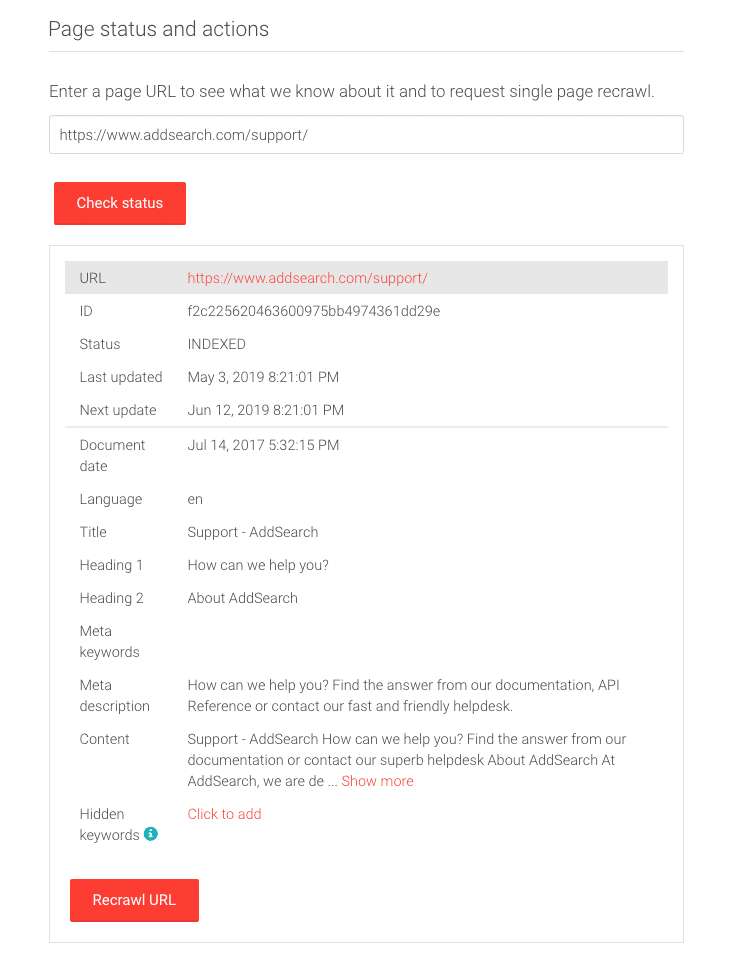
- Click Recrawl URL to re-crawl the page.
The page will be excluded from the index within seconds. You can verify the exclusion by clicking Check status again.
Additional Resources
Using these methods, you can control which individual pages appear in your AddSearch-powered search results efficiently and effectively.