Uploading Frequently Bought Together (FBT) Recommendation Data
To enable the Frequently Bought Together (FBT) feature, upload transaction data that the system can use to generate recommendations.
What you will do
- Prepare your transaction data as a CSV file
- Upload the file via the AddSearch dashboard or push the data using the API
Data format requirements
Upload your transaction data as a CSV file with these specifications:
- The first row must contain exactly these lowercase column headers:
transaction,item, andtime - Each subsequent row represents one item in a transaction
- The
transactioncolumn groups items purchased together - The
itemcolumn contains the unique identifier for the product or document - The
timecolumn records the timestamp of the transaction in ISO 8601 format
Example CSV content:
transaction,item,time
1,229,2023-04-04T06:34+02:00
1,126,2023-04-04T06:34+02:00
2,229,2023-04-04T07:31+02:00
2,256,2023-04-04T07:31+02:00
3,117,2023-04-04T08:34+02:00
You can use any unique product or document identifier in the item column. Typical choices include your product SKU or the AddSearch document ID. The identifier used here must match the field configured in your FBT recommendations settings.
Uploading the data
CSV file upload
- Upload your prepared CSV file via the AddSearch dashboard.
- The file must not exceed 1MB in size.
API upload
Alternatively, you can push transaction data programmatically using our Upload Dataset API, which is recommended for real-time or frequent integrations.
Notes
- Make sure your CSV headers are lowercase as shown.
- Validate timestamp formats to ensure data consistency.
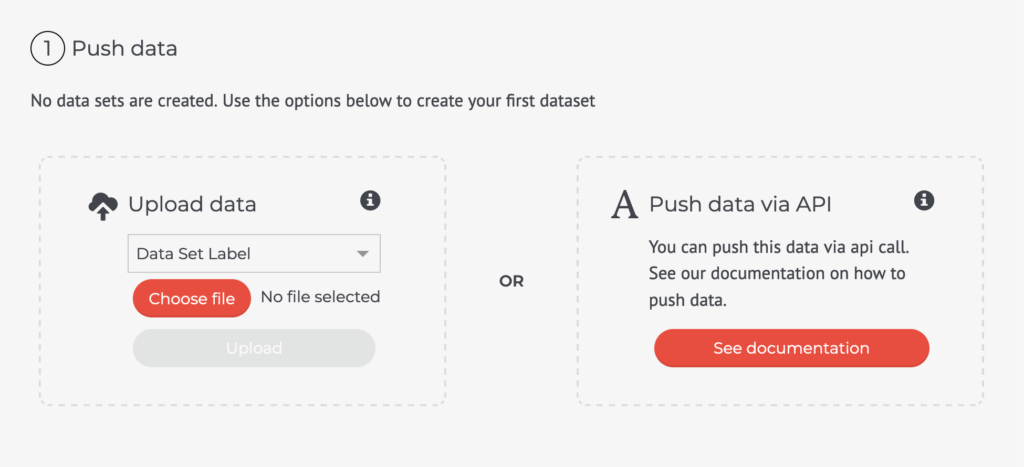
Screenshot: verify if this matches the current dashboard UI.
For detailed configuration of FBT recommendations, see Configuring FBT Recommendations.