Restricting Search to Specific Areas of Your Website
You can limit AddSearch results to certain parts of your website in two main ways:
- Control which pages the crawler indexes.
- Index all content but filter search results dynamically.
1. Control Indexing with Site Areas
Use the Site Areas settings to define which site sections the crawler includes or excludes.
-
To exclude a section, for example
/news/, create a Site Area rule:/news/ EXCLUDE -
To index only a specific section like
/news/, create two rules:/news/ 100%/ EXCLUDE
This configuration keeps only URLs containing /news/ in the index.
Refer to the Site Areas instructions for detailed setup.
For additional methods to exclude content from search, see Including and Excluding Content.
2. Control Search Output with Category Filters
Category filters let you restrict search results on the client side by using page properties assigned during indexing.
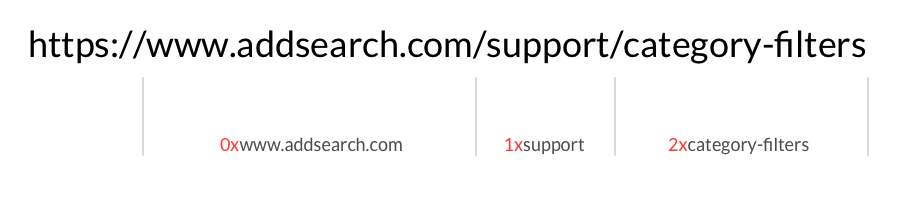
Each indexed page gets a category property reflecting its domain and URL path segments. For example, the URL www.example.org/some/path gets:
0=www.example.org
1=some
2=path
You can configure your search widgets to show results matching specific categories.
Example: Separate Searches for Main Site and Forum
If your main site is at www.example.com and your forum is at forum.example.com, set up distinct search scripts with these category filters.
Main site search script snippet (exclude forum):
// Configure search to include only 'www.example.com' domain
AddSearch.init({
  categories: ['0=www.example.com']
});
Forum search script snippet (include only forum):
// Configure search to include only 'forum.example.com' domain
AddSearch.init({
  categories: ['0=forum.example.com']
});
If forums are subpaths of the main site, for example www.example.com/forum and www.example.com/another-forum, here is how to separate them:
Main site (excluding forums):
AddSearch.init({
  categories: ['0=www.example.com', '1!=forum', '1!=another-forum']
});
Forum search (for /forum path):
AddSearch.init({
  categories: ['0=www.example.com', '1=forum']
});
To restrict search results to deeper nested paths, use slashes / to indicate nested categories. For example:
categories=1xpublic/2xforum
restricts results to the /public/forum path.
Multiple Search Widgets on One Page
Assign unique category filters to different search fields using the data-addsearch-categories attribute:
<input type="search" id="search1" data-addsearch-categories="0=site1.com">
<input type="search" id="search2" data-addsearch-categories="0=site2.com">
Filter by File Type
You can filter results by file type using the doctype category filter. For example, to show only PDFs:
categories=doctype_pdf
Supported file types include:
- doctype_html
- doctype_pdf
- doctype_doc
- doctype_docx
- doctype_ppt
- doctype_pptx
- doctype_xlsx
For further details on configuring these filters, refer to the Site Areas and Including and Excluding Content documentation.