Hidden Keywords — How to Add New Keywords to Pages
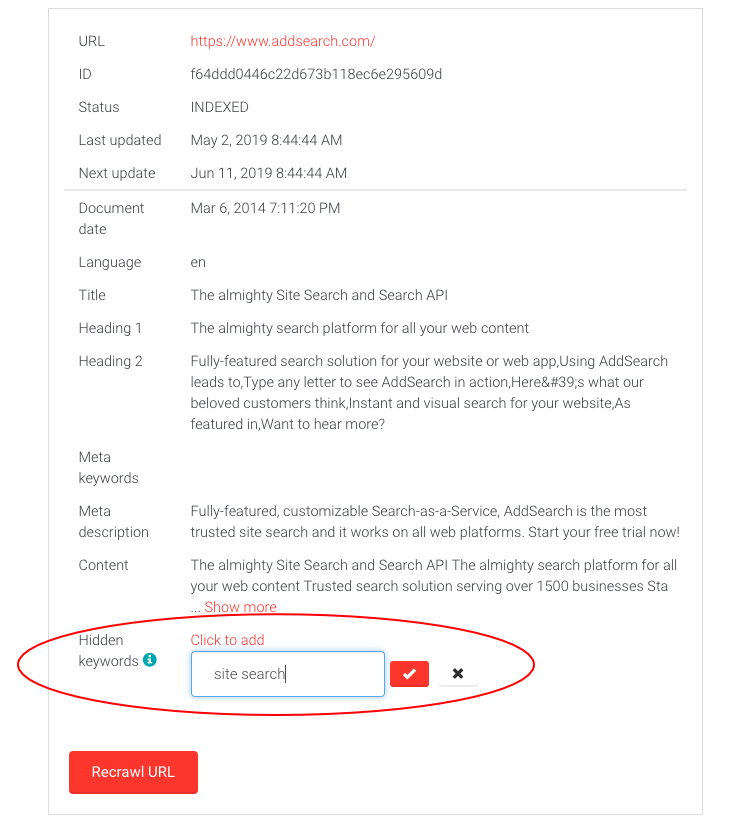
Use hidden keywords to associate additional keywords with an indexed page in AddSearch. Adding hidden keywords improves the page's ranking in search results for terms that do not appear in the page content.
Hidden keywords are helpful for including slang, nicknames, or terms related to competitors' similar products that visitors might use in their searches.
AddSearch also supports other relevance controls such as Synonyms, Pinned results, and Promotions to guide visitors to relevant content.
How to Add Hidden Keywords
-
Log in to your AddSearch account.
-
Navigate to Index tools in the dashboard.
-
Enter the page URL in the input field under Page status and actions.
-
Click Check status.
- If the page is not indexed, you will see "No document found with given URL." Click Crawl URL to index it.
- If the page is indexed, its content will appear on the screen.
-
Click Add next to the Hidden keywords section.
-
Enter your hidden keywords, separated by commas.
-
Click the red checkmark to save your changes.
Changes take effect immediately without needing to re-crawl the page.